
Losing photos never happens at a convenient time. It’s always the memory card you didn’t back up, the folder you cleared out on a whim, or the camera that decided to throw an error right after a shoot you can’t repeat. One moment everything’s fine, and the next you’re staring at an empty drive wondering how badly you just messed up.
That panic is real. And unfortunately, pretty universal.
Here’s the thing though — deleted doesn’t always mean destroyed. If the storage space hasn’t been written over yet, there’s a genuine chance those files are still sitting there, just invisible to your operating system. That’s the window photo recovery software exists to exploit, and Stellar Photo Recovery is one of the tools that does it well enough to be worth talking about.
I spent some time with it. Here’s what I actually found.
Table of Contents
So What Is It, Exactly?
Stellar Photo Recovery is a desktop tool built for one job — getting back photos, videos, and audio files that have been deleted or lost from storage devices. SD cards, memory cards, USB drives, external hard disks, SSDs, cameras, drones — if you can connect it to a computer, the software can scan it.
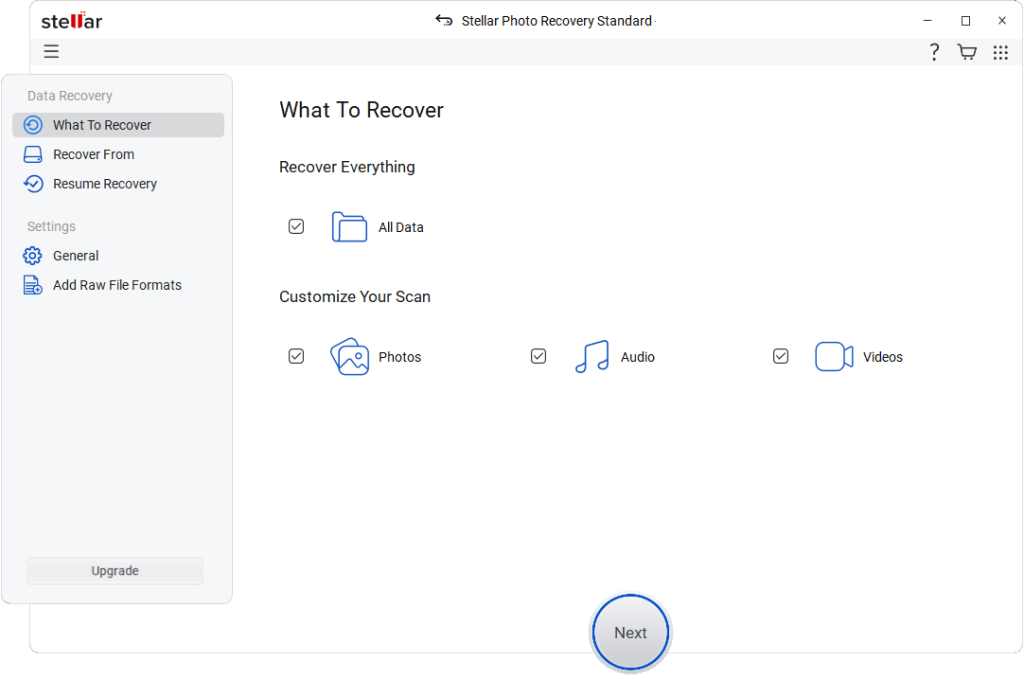
It runs on both Windows and Mac, which matters more than it might seem. A lot of recovery tools pick a side and stay there. Stellar doesn’t make you figure out workarounds because you’re on the wrong platform.
The free version is where most people start, and it’s more genuinely useful than most free tiers in this space. You can scan your device and actually see what’s recoverable — real thumbnails, real files, browsable and previewable — before you hand over any money. That’s a meaningful distinction from tools that hide everything behind a paywall and ask you to trust the process.
Who Actually Needs This?
Honestly, more people than would expect to.
The obvious answer is photographers — someone who shoots on memory cards and has lived through the dread of a card error mid-session knows exactly why this kind of software exists. But it’s not just professionals.
It’s the traveler who got home from two weeks abroad and found half their photos corrupted. The parent who accidentally cleared their camera roll during a storage cleanup. The person who formatted a USB drive before realizing the only copy of something important was on it. Even office users who lost media files from an external drive during a system crash.
If you’ve ever deleted something and felt that immediate stomach-drop of regret, this software was built for that exact moment.
What the Free Version Actually Does
This is worth being specific about, because “free” gets thrown around loosely with recovery tools.
Stellar’s free version gives you a full scan of whatever device you connect and a complete preview of every recoverable file it finds. Not blurred previews. Not a count of files with no context. Actual thumbnails you can browse, check for quality, and confirm are intact before making any decision.
The catch — and it’s a real one — is that saving those files requires buying a license. The scan is free. The preview is free. Recovery of 10 files free. Beyond the 10 files the saving of those recoverable files costs money.
Some people find that frustrating. I think it’s actually the right approach. The worst version of this experience is paying for recovery software, running the scan, and discovering your files are too damaged or too overwritten to retrieve. Stellar’s model means you find that out for free, before any money changes hands. If the preview shows your photos intact, you know exactly what you’re getting when you purchase. If they’re gone, you haven’t lost anything but time.
That’s a more honest setup than most competitors offer.
Using It Day to Day
The process isn’t complicated, which is the point.
Connect your storage device — SD card, USB drive, external hard disk, camera via USB — open the software, select the drive, and run the scan. Depending on how large the drive is and how full it was, scans run anywhere from a few minutes to around half an hour.
When it finishes, results come back organized by file type. Photos grouped together, videos separate, audio files in their own section. That organization matters when a deep scan surfaces hundreds of results — hunting through an unsorted dump of thousands of files is its own kind of nightmare, and Stellar avoids it.
The preview is where I spent most of my time. Opening a photo in preview mode and seeing it render cleanly is a pretty reliable signal that the recovery will work. Files that are heavily corrupted show that in preview too — so you’re not recovering garbage and finding out afterward.
Where It Actually Earns Its Reputation
Memory cards are where Stellar consistently does its best work. Accidentally formatted SD cards, cards that a camera suddenly couldn’t read, cards with file system errors — these are the scenarios the software handles with real confidence. Results on card recovery are strong enough that it’s become a go-to recommendation in photography communities for exactly this reason.
RAW file support is the other thing that separates Stellar from more generic recovery tools. Most free or budget options cover JPEG and PNG and call it done. Stellar supports RAW formats from Canon, Nikon, Sony, Fujifilm, Panasonic, Olympus, and other major camera brands — which means professional photographers aren’t left out in the cold when something goes wrong on a shoot.
External drives and USB storage work well too. Standard deletions, accidental formats, drives that stopped showing up correctly — all within comfortable territory for the software.
Where It Has Real Limits
Worth being straight about this, because no recovery tool is magic.
If new data has been written to the storage device since the files were deleted, recovery gets significantly harder. That space has been partially or fully overwritten, and there’s only so much any software can do about that. This is why the standard advice — stop using the device immediately after you realize something’s been lost — isn’t just a precaution. It’s the difference between recovering everything and recovering nothing.
Physical damage is a different problem entirely. If a hard drive has mechanically failed, if an SD card has snapped in half, if a USB drive went through a washing machine — software isn’t going to fix that. Those situations call for professional recovery labs, not desktop tools.
And again, the free tier only gets you to preview. Saving files requires the paid license. That’s not a hidden gotcha, but it’s worth knowing going in so you’re not caught off guard.
Is the Paid Version Worth Buying?
Depends entirely on what you lost.
For files that genuinely matter — a wedding shoot, a family trip, years of photos that exist nowhere else — the license cost is small against what you’d lose by giving up. The math isn’t even close in those situations.
For files you could probably live without, or where the preview shows significant damage, that’s a harder sell. The preview is specifically designed to help you make that call before committing.
One thing worth noting: it’s a one-time purchase for the standard license, not a subscription. In a software landscape increasingly addicted to recurring billing, that’s a detail worth appreciating.
How It Compares to the Alternatives
Recuva is free, functional, and widely used — but it’s Windows only, the RAW support is limited, and the interface is starting to show its age. For basic JPEG recovery on Windows it’s a reasonable starting point, but it hits its ceiling quickly.
PhotoRec is open-source and impressively powerful under the hood, but it strips filenames, drops everything into disorganized folders, and offers very little in the way of guidance. Experienced users can work with it. Everyone else will find it more stressful than the data loss itself.
Disk Drill has a polished interface and some useful features, but the free recovery limits are tight and it can feel like every feature is nudging you toward the paid version.
Stellar sits comfortably in the space between — better format support than Recuva, far more usable than PhotoRec, more transparent about what the free version actually does than Disk Drill. It’s not the cheapest option once you move to paid, but the overall package holds up well against the competition.
The Bottom Line
Stellar Photo Recovery does what it says it does, and it does it without making the experience harder than it needs to be. The free scan and preview system is the standout feature — it treats you like someone who deserves information before making a decision, rather than someone to be upsold immediately.
Format support is wide enough to cover both casual users and working photographers. The interface doesn’t require any technical knowledge to navigate. Results on SD cards and memory cards are reliably strong.
Is it perfect? No. Nothing in the recovery space is. But as a first tool to reach for when photos go missing — especially before you’ve done anything that might overwrite them — it’s one of the more sensible choices available.
Download the free version, run the scan, and see what it finds. If your photos are there, you’ll know within the hour. If they’re not, you’ll know that too — and you’ll know it without spending a penny.
Sometimes that’s exactly the answer you need first.
At a Glance
| Free scan & preview | Yes — no purchase required |
| Platforms | Windows & Mac |
| Best for | SD cards, cameras, external drives, RAW files |
| File format support | Extensive — JPEG, PNG, RAW, MP4, MOV & more |
| To save recovered files | Paid license required |
| Overall rating | 4.6 / 5 |